Best Tech Organizer for Travel by Loadout
The short answer
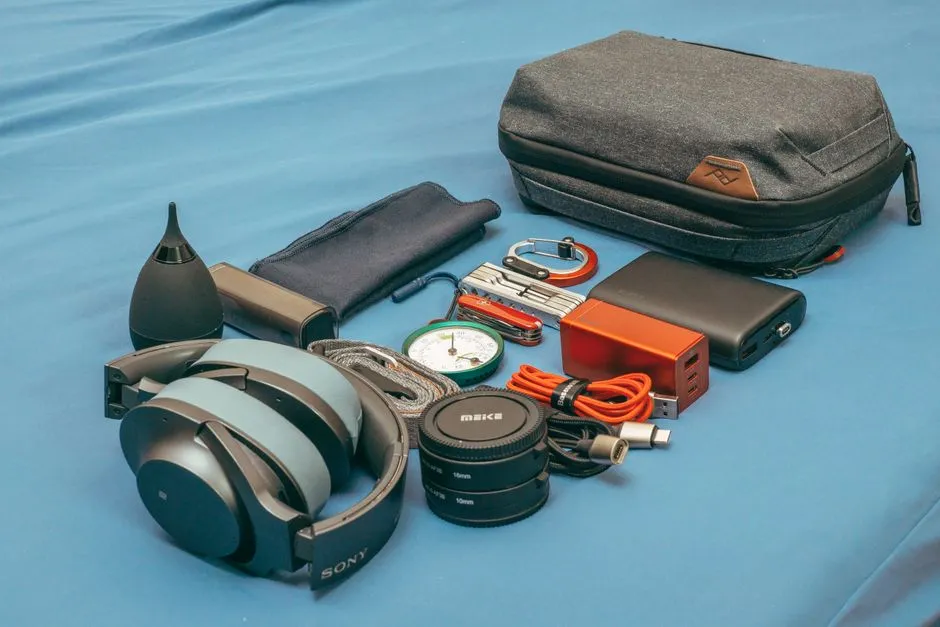
The best tech organizer for most travelers is a compact soft pouch that opens flat, has light padding, uses a few broad cable loops and a simple pocket layout, and fits the charger's actual depth. It balances access, weight, and bag efficiency better than a rigid case or elaborate cable board for an ordinary phone-and-laptop kit.
Choose by loadout, not by the volume of tiny adapters artfully arranged in the listing. This guide compares four organizer styles on protection, access, packing efficiency, layout flexibility, empty weight, and ability to keep a battery visible and undamaged.
| Organizer style | Best for | Main advantage | Worth knowing |
|---|---|---|---|
| Compact clamshell pouch | Most one-person travel kits | Balanced access and flexible packing | Limited crush protection |
| Hard-shell case | Fragile adapters and small drives | Better resistance to external pressure | Bulky and less adaptable |
| Cable roll | Many cables of similar thickness | Fast visual inventory | Weak protection for rigid devices |
| Modular micro-pouches | Families, teams, mixed kits | Gear can be divided by person or task | More pieces to track |
Best overall: compact clamshell pouch
Why it wins: A book-style opening shows both sides without requiring cables to be excavated from a vertical stack. Two or three elastic loops, one zipped pocket, and an open compartment handle a wall charger, mouse, short leads, earbuds, and small adapters without prescribing one arrangement forever.
Look for published internal dimensions, light but present padding, finished seams, and zippers that do not press directly into a screen or battery. Measure the thickest charger; exterior length and width do not reveal usable depth.
Worth knowing: Soft walls cannot prevent serious crushing. Keep the pouch away from the bottom of an overpacked bag and use the device maker's protective case for fragile equipment. Overfilling also transfers pressure across the clamshell and can press plugs or chargers into other items.
Best for fragile small gear: hard-shell case
Why choose it: A structured shell better resists pressure from shoes, books, and overhead-bin rearrangement. Adjustable dividers can isolate small drives, camera adapters, or compact devices that should not rub against metal plugs.
Check whether the case is described as impact-resistant, water-resistant, or waterproof—and do not treat those words as synonyms. Verify the exact test or rating if water protection matters. A zipper around a rigid shell is not automatically sealed.
Worth knowing: The shell occupies the same volume even when half empty. Fixed internal shapes may also fight unusual chargers. It protects against some external pressure, not extreme impact, water immersion, theft, or data loss; maintain backups separately.
Best for cable-heavy kits: cable roll
Why choose it: A cable roll places cables in parallel pockets or straps, making length and connector type visible. It suits photographers, presenters, or technicians carrying several leads but few bulky devices. The rolled diameter adapts somewhat to the load.
Check that pockets are broad enough to avoid sharp bends and that plugs do not strike each other. A separate small closed pocket helps contain memory cards or adapters that could escape from open sleeves.
Worth knowing: Rolls provide little crush protection and become awkward around large chargers. Dangling hook-and-loop closures may snag other fabrics. A tightly rolled cable is not a well-organized cable; respect the manufacturer's bend and storage guidance.
Best for shared travel: modular micro-pouches
Why choose them: Several small, distinct pouches let a family or work group divide power, audio, presentation, and personal gear. One pouch can move to a day bag while the rest remain secured. Clear panels or external labels reduce repeated opening.
Use different colors or large text rather than relying on subtle tags. Assign each battery to a person and device so nobody packs duplicate weight while a required cable is missed.
Worth knowing: More modules mean more closures, more empty fabric, and more objects to misplace. Very small pouches can hide in seat pockets. Count them during every transfer and never split critical travel documents across gadget storage.
Measure before buying
Lay out the real kit, remove “just in case” duplicates, and group cables with loose reusable ties. Measure the longest rigid item, the thickest charger, and the available pocket in the carry-on. Compare those with the manufacturer's internal dimensions and the seller's return terms.
The carry-kit guides recommend checking:
- Empty organizer weight
- Interior dimensions and usable depth
- Closure clearance when loaded
- Whether battery labels remain visible
- Pressure points across screens or cells
- Stitching and edge finishing
- Return policy and warranty terms
If the organizer will fly, use our guide to packing electronics for air travel before loading power banks. The gadget guides also separate current official rules from organizer features. A pouch cannot overrule battery restrictions or make a damaged cell safe.